
Microsoft Teams has unveiled new updates to its video conferencing software, including a "Together mode" that puts participants in a virtual meeting hall. That and other changes will be rolled out to users next month.
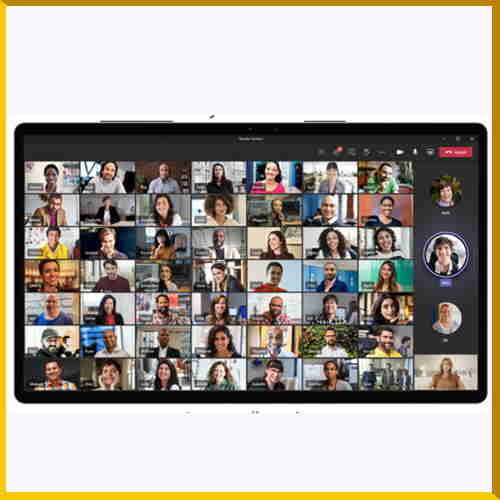
The most significant update is the new Together mode, which, as the name suggests, aims to make video conferences more informal and bring participants together. Instead of 49 individual participant rectangles appearing in gallery mode, switching to Together mode removes the barriers between participants and uses “AI segmentation technology” to place the head and shoulders of participants side by side in a virtual auditorium.
Microsoft is currently working on other views that will available in this mode, including a virtual coffee shop.
Jaron Lanier, the CTO Prime Unifying Scientist at Microsoft, said the new viewing mode is a direct consequence of the pandemic and the significant increase in the number of video calls people make. He said,“This is very much a specific design in response to the pandemic. The design was initiated during the pandemic, developed during the pandemic and is released during the pandemic,” Lanier said.
Though at first Together mode might seem a like a gimmick, the underlying technology is fundamental to improving the video conferencing experience.
On most video calls, eye contact – or the lack of – is an ongoing problem, with people often appearing to look in the wrong direction. Together mode mimics the geometry of reflection, meaning that every participant is looking at the whole group through a big virtual mirror.
Additionally, everyone in Together mode is in a fixed position. If one person happens to appear in the fourth seat of the bottom row on their own screen, that person would appear in the fourth seat of the bottom row on everyone else’s screen.
In a further effort to make meetings more inclusive, Teams is also rolling out live reactions and emojis, providing participants with the ability to react instantly to each other in a non-verbal way. In-meeting chats sent during a Teams session will appear as on-screen chat bubbles, eliminating the need for users to open a separate chat window and distracting them from the video call. Teams is also introducing suggested replies, similar to those in Outlook and Gmail, allowing users to give quick feedback.
Those who use Microsoft Teams via the mobile app willl soon be able to have the company's voice assistant, Cortana, make calls, join meetings, send chat messages and share files. Microsoft is also adding live transcripts to Teams later this year along with the ability to translate live captions into subtitles so anyone can follow a meeting conducted in another language.

See What’s Next in Tech With the Fast Forward Newsletter









Tweets From @varindiamag
Nothing to see here - yet
When they Tweet, their Tweets will show up here.